Enterprise NoSQL Database
The Enterprise NoSQL Database module (also called MangoNoSQL or IasTSDB) is an embedded, high-performance time-series database designed specifically for storing point value history in Mango. It is included in the commercial edition of Mango and replaces the default behavior of storing point values in the relational SQL database (H2 or MySQL).
Overview
Mango collects time-stamped values from data sources at rates that can reach millions of samples per day across thousands of data points. Storing this volume of data in a traditional relational database creates significant overhead from indexing, transaction management, and row-level locking. The NoSQL module solves this problem by writing point values into a purpose-built, append-optimized time-series data store that is designed for sequential writes and range-based reads.
When the NoSQL module is installed, the pointValues and reports tables are moved out of the SQL database and into the NoSQL store. All other configuration data (data sources, data points, users, events, etc.) remains in the relational database.
How Data Is Stored
Point values are organized into shard files on disk. Each shard covers approximately 24.86 days of data (2,147,483,648 milliseconds). The files are stored under MA_HOME/databases/mangoTSDB/ in a directory hierarchy organized by point ID. A typical shard file is named using a numeric hash of its time range, for example 685.data.rev.
NoSQL shard rollover calculator
Shard 834 contains the reference date (EDT). Mango is currently writing to shard 834.
| Shard ID | Starts (EDT) | Ends (EDT) | Status |
|---|---|---|---|
| Jan 27 2026 at 10:08:45 EST | Feb 21 2026 at 06:40:09 EST | Started on | |
| Feb 21 2026 at 06:40:09 EST | Mar 18 2026 at 04:11:33 EDT | Started on | |
| Mar 18 2026 at 04:11:33 EDT | Apr 12 2026 at 24:42:56 EDT | Started on | |
| Apr 12 2026 at 24:42:56 EDT | May 06 2026 at 21:14:20 EDT | Started on | |
| May 06 2026 at 21:14:20 EDT | May 31 2026 at 17:45:44 EDT | Started on | |
| May 31 2026 at 17:45:44 EDT | Jun 25 2026 at 14:17:07 EDT | Started on | |
| Jun 25 2026 at 14:17:07 EDT | Jul 20 2026 at 10:48:31 EDT | Started on | |
| Jul 20 2026 at 10:48:31 EDT | Aug 14 2026 at 07:19:55 EDT | Started on | |
| Aug 14 2026 at 07:19:55 EDT | Sep 08 2026 at 03:51:18 EDT | Started on | |
| Sep 08 2026 at 03:51:18 EDT | Oct 03 2026 at 24:22:42 EDT | Started on | |
| ReferenceCurrent | Oct 03 2026 at 24:22:42 EDT | Oct 27 2026 at 20:54:06 EDT | Started on |
| Oct 27 2026 at 20:54:06 EDT | Nov 21 2026 at 16:25:29 EST | Starts on | |
| Nov 21 2026 at 16:25:29 EST | Dec 16 2026 at 12:56:53 EST | Starts on | |
| Dec 16 2026 at 12:56:53 EST | Jan 10 2027 at 09:28:17 EST | Starts on | |
| Jan 10 2027 at 09:28:17 EST | Feb 04 2027 at 05:59:40 EST | Starts on | |
| Feb 04 2027 at 05:59:40 EST | Mar 01 2027 at 02:31:04 EST | Starts on | |
| Mar 01 2027 at 02:31:04 EST | Mar 26 2027 at 24:02:27 EDT | Starts on | |
| Mar 26 2027 at 24:02:27 EDT | Apr 19 2027 at 20:33:51 EDT | Starts on | |
| Apr 19 2027 at 20:33:51 EDT | May 14 2027 at 17:05:15 EDT | Starts on | |
| May 14 2027 at 17:05:15 EDT | Jun 08 2027 at 13:36:38 EDT | Starts on | |
| Jun 08 2027 at 13:36:38 EDT | Jul 03 2027 at 10:08:02 EDT | Starts on |
Each shard covers 2,147,483,648 ms (~24.86 days). Shard IDs match the numeric prefix in filenames such as 834.data.rev. Shard boundaries are always computed in UTC using the same algorithm as Mango's TinyTSDB store; dates and times above are shown in your selected time zone for convenience.
Each data point has its own directory structure within the TSDB, which allows the database to read and write values for individual points without contending with other points. This architecture provides excellent write throughput when data is arriving for many points simultaneously.
The Batch Write-Behind System
To avoid slowing down data collection, the NoSQL module uses a batch write-behind system. When a new point value arrives, it is placed into an in-memory queue rather than being written to disk immediately. Background tasks periodically drain this queue and write batches of values to the appropriate shard files.
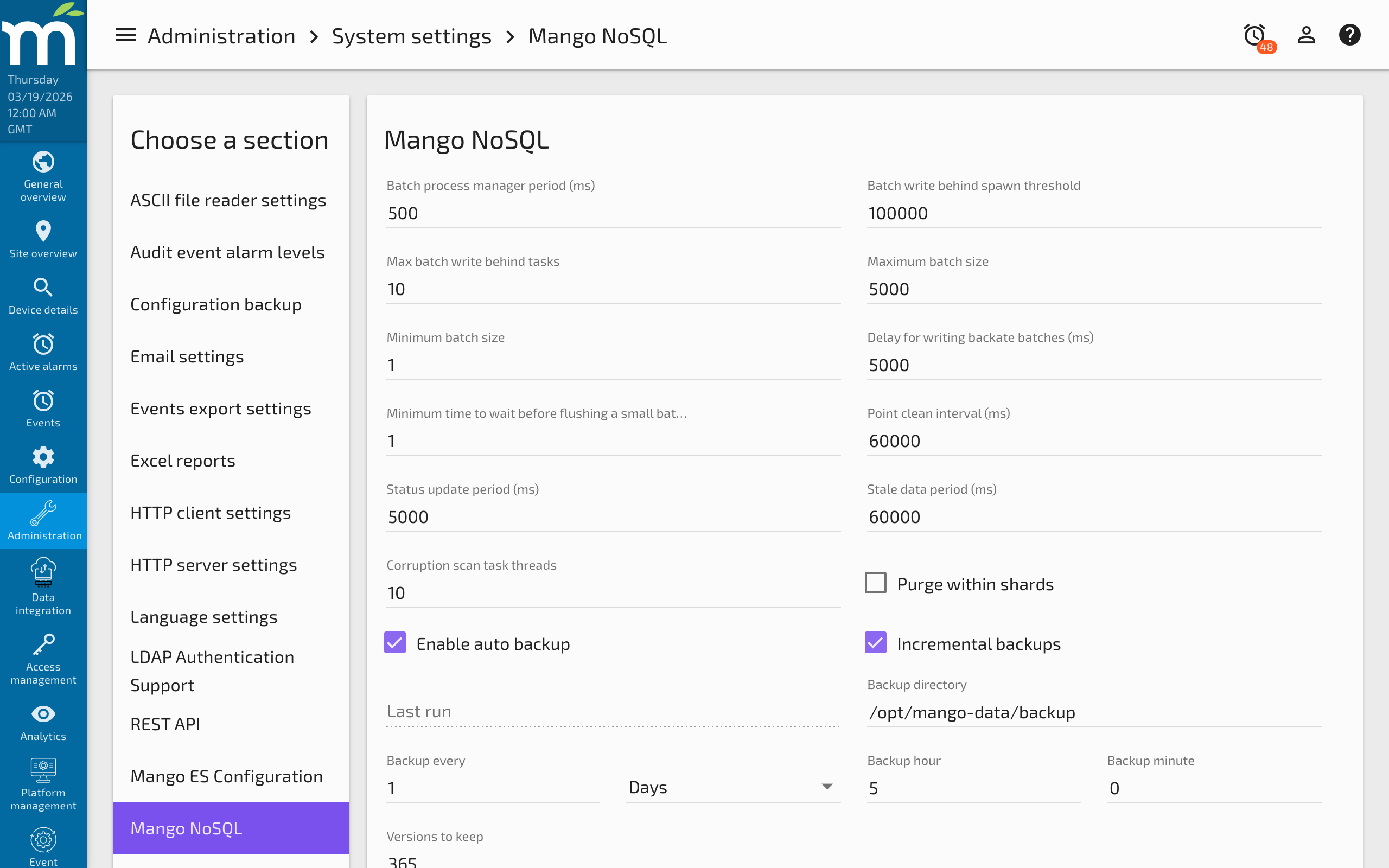
The key settings that control this behavior are:
- Batch write behind spawn threshold -- How many values must accumulate in the queue before a new write task is spawned.
- Max batch write behind tasks -- The maximum number of concurrent write tasks. Each task consumes a high-priority thread.
- Batch write inserts per task -- How many values each task pulls from the queue per iteration.
If the write-behind system falls behind the incoming data rate, values accumulate in the queue. If the queue overflows, a NoSQL Data Lost event is raised. This is one of the most common issues encountered in high-load Mango systems.
The "NoSQL Task Queue Full" Error
If you see a "NoSQL Data Lost" alarm or "Task Queue Full" event in the Mango event list, it means the write-behind system could not keep up with the volume of incoming point values. Common causes and remedies include:
- Too many data points polling too frequently -- Reduce polling rates or stagger data source schedules.
- Slow disk I/O -- Use faster storage (SSD recommended for production). Verify with
iostator similar tools. - Insufficient write threads -- Increase Max batch write behind tasks in the NoSQL settings (requires a corresponding increase in the high-priority thread pool).
- Large purge operations running concurrently -- Schedule purges during off-peak hours.
See NoSQL Database Performance Tuning for detailed tuning guidance.
Purge Settings
Data purging removes old shard files to free disk space. Purge settings can be configured at the system level (under System Settings > Purge Settings) and overridden per data source or per data point.
Because data is stored in shards covering approximately 25 days, setting a purge period shorter than one shard length is inefficient -- the system must open and rewrite individual shard files rather than simply deleting whole files. For best performance, set purge periods to at least 30 days.
As a rough guideline, 200 million point values consume approximately 4 GB of disk space.
Configuration Properties
The following properties can be set in mango.properties:
| Property | Description | Default |
|---|---|---|
db.nosql.location | Base directory for all NoSQL data storage | databases |
db.nosql.pointValueStoreName | Folder name for point value storage within the base location | mangoTSDB |
db.nosql.maxOpenFiles | Maximum number of open file handles (set to 2x your data point count) | 500 |
Backups
The NoSQL module supports automatic backups to zip files. Incremental backups capture only the changes since the last backup, reducing backup size significantly. Backup settings are configured under Administration > System Settings > Mango NoSQL Configuration. See How to Backup Your Mango System for complete backup guidance.
Related Pages
- NoSQL Database Performance Tuning — Tune batch write-behind settings, shard purging, and resolve data lost events
- Migrating Into NoSQL — Import historical data from SQL databases into the NoSQL store
- How to Backup Your Mango System — Configure automated NoSQL backups and incremental backup strategies
- Managing Disk Space — Monitor and manage disk usage for NoSQL shard files
- Logging Settings — Control how point values are logged before they reach the NoSQL store